
Augmented Reality-based Virtual Smartphone
November 25, 2022 2022-11-25 18:07Augmented Reality-based Virtual Smartphone
Abstract
In the real world, humans communicate with each other to share their thoughts or feelings. Here VSP (Virtual Smart Phone) is introduced to connect both the Physical and virtual worlds. VSP supports natural hand gestures, Hand movement and the Internet. VSP users can communicate with each other by Virtual mobile phone. The touch gesture radio wave and cloud computing technology are used to achieve this.
The cell phone dependency will be removed with VSP. By touching the user’s Palm dialling a fresh call, watching movies, or viewing images on the user’s palm or wrist is possible. Calls are placed and terminated using touch gestures. A touch-based engagement in communication is possible using VSP.
Introduction
Several multi-touch and gesture-based interactive system technologies are associated directly via touch and organic hand gestures to achieve it. Mainly, information is still kept on screens or other projection surfaces. The mobile phones will be replaced by VSP devices which virtually use natural gestures and multi-touch input on the user’s palm to connect them over a network. The human hands transform into mobile phones using VSP.

Fig. 1
Equivalent Work
All the previously designed systems are not able to recognise touch-independent freehand gestures. With VSP (Virtual Smart Phone Technology), it can improve the digital aspects of human lives based on hand augmented reality, gesture recognition, computer vision-based algorithm, etc.
Augmented Reality
When the direct or indirect view of real-world components is represented by virtually, then it is called augmented reality (AR), which is used in virtual smartphones. Displays, tracking, input devices, and computers are the major hardware components required to make the functionalities of augmented reality. Besides augmented reality (AR) modern smartphones support powerful CPUs, cameras, accelerometers, GPS, and solid-state compass, which can also give a promising platform to support it.
Identification of Gesture
In computer science, gesture identification is the main aim and using mathematical algorithms human gestures can be analysed. From any kind of body, movement gestures can come, although they usually start with the hand or the face. Face and hand gesture detections are two current areas of emphasis in the field. Cameras and computer vision algorithms have been used in a variety of ways to translate sign language.
Algorithm based on computer vision
Computer vision is depending on the study of artificial intelligence systems which are used to extract data from images. The picture data can be in the form of video clips, numerous camera views, or multi-dimensional data from a medical scanner, among other formats. The software uses computer vision-based algorithms to track the user’s gestures. The view-based hierarchical hand models, multi-scale colour feature detection, and particle filtering are the foundation of the computer vision system used to track and identify the hand positions that operate the menus. Multistage colour feature detection is done on each image. Then, using a layered sampling extension known as hierarchical layered sampling, the hand postures are concurrently identified and tracked using particle filtering. Prior skin colour is added to the particle filtering to enhance the system’s performance.
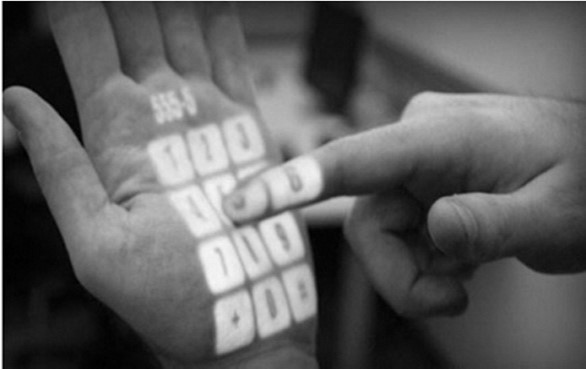
Fig. 2
Figure 2 represents that the Recognition of the Gesture-based Mobile Keypad is also similar to augmented reality (AR). Firstly, with VSP, users can initially make hand motions to engage with the projected information. Secondly, rather than being projected onto glasses, goggles, or watches, the information is instead projected onto hands, objects, and surfaces themselves, creating a radically distinct user experience.
Goal
The VSP invention relates to data transfer and creating communication without platform dependence from one human body to another human body. It also creates communication between the human body and digital devices. VSP essentially aims to increase the interaction and palpable nature of user-device interactions. The purpose of this technology is to connect with people using touch gestures on their hands or palms as well as with digital gadgets. VSP supports two different types of data transport.
Firstly it can establish voice communication between users without the requirement of an actual cell phone thanks to GSM technology.
Secondly, it is used to transfer data between every person and digital devices. Internet is used for authentication techniques like password, face recognition, palm line recognition, or fingerprint detection to distinguish between different users. Voice over Internet Protocol (VSP) allows voice communication between humans utilising either GSM or Internet technology.

Fig. 3
The use of VSP to transfer data from one person or device to another or between devices. The first and second digital devices may both employ VSP Technology and be connected to a network that includes a cloud for data storage.
Working Principle
The four main processes in how a VSP operates are as follows: Activating and Authenticating the VSP, Creating and Receiving calls, Taking Pictures and Videos, Copying and Pasting or Passing data to other VSPs and digital devices.
- Activating VSP
The Power Button on the wearable VSP gives the user the ability to turn the gadget on or off. A status indicator icon displays on the user’s hand when the VSP Device is enabled as desired by the user. This includes face recognition, picture selection, fingerprint detection, and palm line detection.
- Creating and Receiving Calls
Creating Calls
After turning on VSP, users can call using a virtual key or voice recognition technology. Using the following two methods VSP can establish calls between two users.

Fig. 4
- Creating a Call with a SIM:
The Global System for Mobile Communications / Code Division Multiple Access (GSM/CDMA) Technology was used by the VSP device to establish the call utilising a micro SIM (Subscriber Identity Module).
- Placing a Call Over VOIP:
The Wi-Fi (Wireless Fidelity) and Mobile Data options on the VSP device allow users to connect to the Intranet or Internet. VOIP (Voice Over IP) technology is used to create calls. One VSP user as well as other GSM users can communicate with each other by using VOIP. Without the user’s knowledge, calls are made using their SIM cards when they are not connected to the internet or intranet, but when they are, they are asked to choose how they wish to make the call, and based on their choice, the call is connected to the other person.

Fig. 5
Receiving Calls
At the time of receiving a call from one VSP user to another VSP user or by a user of another digital device (physical mobile phone, laptop, desktop, and PDA), the notification of the incoming call will be shown as per the user’s selected Profile if the user selects vibrate mode. The small vibrator motor indicates the incoming call by vibration and also displays the identity of the calling user using the high-Density projector of the VSP. If the user chooses the Sound Mode, an incoming call will be announced by the user’s chosen ringtone and shown on the back of the Palm. Only the caller’s name is displayed on the back of the palm when in silent mode. The user only needs to touch, swipe, or use another touch action to answer an incoming call. The caller can utilise a wired or Bluetooth headset to speak by plugging them into the 3.0 port on the VSP device. Additionally, the user’s VSP Device Speaker and Mice can be used to receive calls directly. Both users must have a WI-FI or mobile data connection to the internet to make VOIP calls.
- Taking Pictures and Videos
By clicking the capture image button or making a gesture (such as using our thumbs and index fingers to take pictures), VSP is also capable of taking high-quality still and moving pictures with their high-quality camera. Following the photo being taken, the VSP System displays the image on the user’s hand. The user only needs to switch the camera’s mode from photographs to video to record video using the same action. While taking an image or video, the user can use hand gestures to zoom in or out.
- Copying or Pasting Data
VSP supports to Transfer (Copy/Paste) Data from one another’s human body or device. by employing a single touch gesture The user must first log in to the VSP device and be connected to the Internet or intranet to copy data. Long pressing (Detect by listener programme) on a data item that is capable of being copied for more than 1.5 seconds, as exhibited on the user’s arm using the VSP projector, is used in VSP to identify copy events. Every time a user touches a piece of copyable data, a touch listener programme starts keeping track of the time. When the time reaches the predetermined threshold (1.5 seconds), a message appears to let the user know about the successful completion of copying of data items and also its additions to the data cloud. There are other methods for copying data to the cloud as well (instead of long-press for 1.5 seconds). The user copies several files using this technique, and all the copied data is temporarily saved in the cloud with a unique identifier for each piece of data.
Used Technologies
VSP is essentially a wearable computer that combines both hardware and software. In terms of hardware, VSP includes a processor, RAM and ROM memory, power source (battery), sensors (such as an accelerometer and 16 proximity sensors for touch detection on the arm), a micro vibratory motor, a USB port (for charging or connecting other devices), 4 micro projectors (similar to pico projectors), an HD camera for taking pictures and videos, and more. To achieve all the goals, the software makes use of a gesture detection system, a touch-based interface system, augmented reality, and computer vision-based algorithms.
The following technology is used by VSP to place calls, take calls, copy data, paste data, and pass data to other VSP and digital devices.
- Voice Call: Voice calls made with VSP are made either through a SIM (GSM/CDMA) or the internet utilising VOIP technology.
- Data Transfer: When using VSP, data is transferred between one body and another body or device using data clouds.
CONCLUSION:
VSP is a computer-vision-based gestural interface system that suggests using natural hand movements as the method to engage with that information. It augments the real world around us with digital information. It links the real world and the virtual one. VSP offers simple methods for data transfer and communication between various users and digital devices.
The two needs we have for the future are met by the VSP invention. First off, there are no device physical dependencies. Additionally, it links the physical and virtual worlds. The Following Are Some VSP Applications:
- Employed in a health monitoring system.
- Used for Product/Item Information Search.
- Used to link weather updates and news.
- Used to virtually connect various devices.
- Used in the system of education and training.
References
[1] Mathias Kolsch, Matthew Turk, “keyboards without keyboards: a survey of virtual keyboards” Dept. of Computer Science University of California at Santa Barbara, CA.
[2] P. Mistry, Liyan Chang, P. Maes. “wuw – wear your world – a wearable gestural interface” Boston, United ACM 978-1-60558-246- 7/09/04.
[3] Didier Chincholle, Mikael Goldstein, “the finger-joint gesture wearable keypad” Stockholm, Sweden Research, SE-164 80.
[4] Dr. Niranjan Bhattacharyya, Happy, Pragti, ”Sparsh (Touch The Cloud) ” International Journal of Emerging Technology and Advanced Engineering (IJETAE), ISSN 2250-2459, ISO 9001:2008 Certified Journal, Volume 5, Issue 3, March 2014.